Laser LaserOffDelay
Sets the delay for turning off the laser when marking.
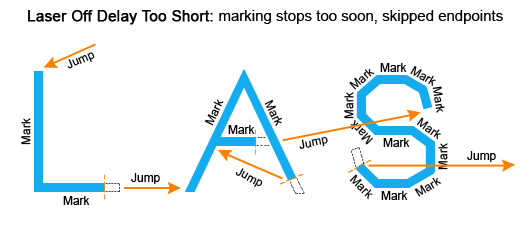
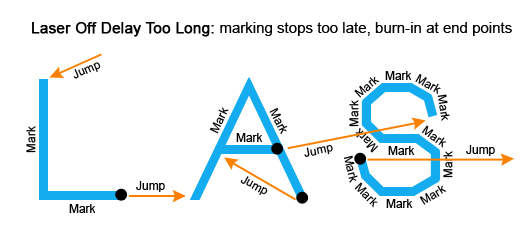
The Laser Off Delay can be used to prevent burn-in effects at the end of a vector. This delay in time before the laser is turned off is typically used to turn off the laser just before the last few microsteps of a mark command to ensure that the marking stops exactly where it is desired to stop.Typically, too short of a delay will cause skipping of line segments, and too long of a delay will cause burn-in at the end of line segments.
The goal is to adjust the Laser Off Delay to ensure uniform marking with no variations of intensity throughout the desired vector.
Syntax
| LaserOffDelay = int value (Laser off delay time in microseconds.) |
----This program demonstrates how the global settings of a laser works. User can change the parameters and observe the marking quality of a rectangle. This program will also display the Marking time.

--Set the units as Millimeters
SetUnits(Units.Millimeters)
--Start the timer
Stopwatch.Start()
-----------------Laser Delay control Settings-------------------
--Delay in time before the laser is turned off
Laser.LaserOffDelay = 0
--Delay in time before the laser is turned on when marking relative to micro-vector generation. A negative value means that LASERON is asserted before micro-vectoring begins.
Laser.LaserOnDelay = 0
--Set the time that all laser signals are time shifted relative to the issuance of galvo position commands.
Laser.LaserPipelineDelay = 3200
-----------------Laser Motion Delay Setting--------------
--Set the delay in time at the end of a laser jump
Laser.JumpDelay = 60
--Set the delay in time at the end of a series of marks
Laser.MarkDelay = 60
--Set the delay in time at the junction of two marks
Laser.PolyDelay = 0
--Variable polygon delay disabled. (true = enabled, false = disabled)
Laser.VariPolyDelayFlag = false
----------------Laser Marking Settings------------------
--Set Laser Modulation frequency
Laser.Frequency = 6
--Set laser jump speed in mm/sec
Laser.JumpSpeed = 250
--Set Laser Marking speed in mm/sec
Laser.MarkSpeed = 150
--Set channel 1 duty cycle as a percentage
Laser.Dutycycle1 = 50


--Draw a box with a width and height of 25 Millimeters
Image.Box(0, 0, 25, 25, 0)


--Blocks the script execution until the device finishes processing instructions in the buffer.
Laser.WaitForEnd()
--Display the time
Report(Stopwatch.Time())