MOTF(Mark On The Fly)
Marking On The Fly (MOTF) support is provided through the use of several configuration and activation commands. Motion tracking in either the X, Y or both axis can be configured using a digital quadrature input, or by simulating the motion in situations where an encoder feedback is not available but the motion speed is relatively constant.
The default single-axis MOTF configuration is set using the parameters Motf.CalFactor, Motf.Mode and Motf.Direction defined in the Controller Configuration file and additionally changeable as part of a job. Run-time control of the MOTF operation is performed through the use of several commands including Motf.Initialize and Motf.StartTracking.
The MOTF commands are designed to permit multiple scenarios that include variable spaced part detection, uniformly spaced image marking, and tiling based continuous image marking. The diagram below illustrates how a Script would initiate and control a sequence of MOTF operations where a part is detected and marking synchronized with the position and motion of each part.
Typical MOTF Job Flow
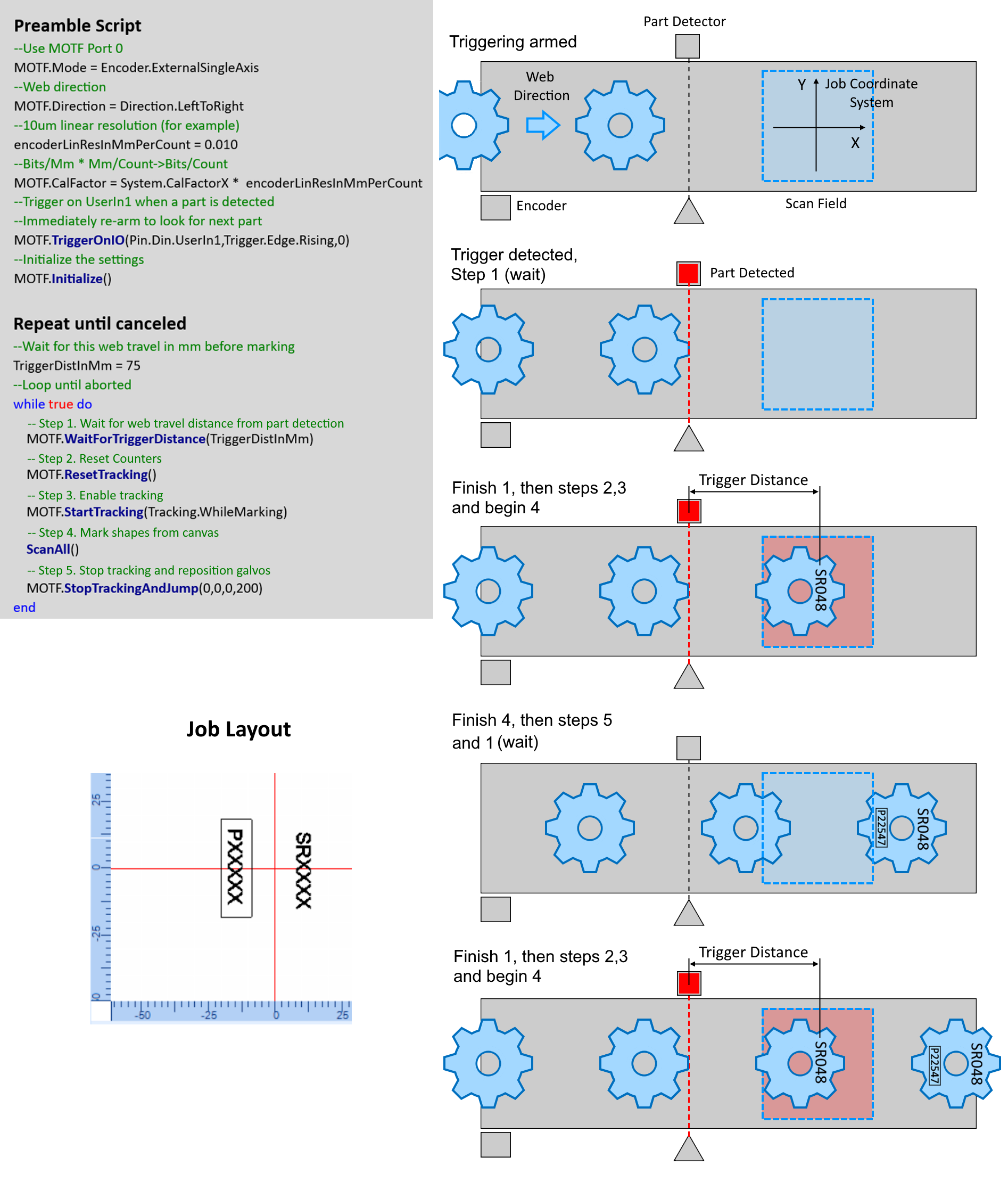
More illustrations - Tipical constant spacing MOTF job
Properties
| CalFactor | Sets the relationship between laser positioning bits to motion encoder counts. This value will be applied to both the MOTF 0 and MOTF 1 encoder ports. |
| CalFactor0 | Sets the relationship between laser positioning bits to motion encoder counts for encoder port MOTF 0. |
| CalFactor1 | Sets the relationship between laser positioning bits to motion encoder counts for encoder port MOTF 1. |
| Direction | The target travel direction of the web or conveying system relative to a job coordinate system. |
| Mode | Defines how MOTF position information is derived. |
| Tracking | Sets the MOTF tracking behavior. |
| WaitForCounterPort | Sets the MOTF port that will be used for commands |
Methods
| Initialize | Initialize the Scan controller for Marking-on-the-fly. |
| ResetTracking | Reset all counters used in the MOTF model. |
| StartTracking | MOTF compensation is activated for all geometric shapes. |
| StopTrackingAndJump | Stops MOTF compensation and jump to reset location. |
| TriggerOnIO | Sets the trigger source for the part sensing trigger port |
| WaitForCount | Wait for HW encoder counter to reach or exceed a specific value. (Deprecated) |
| WaitForDistance | This command will wait for a distance (in user units) to reach or exceed a specific value. |
| WaitForTriggerCount | Wait for the trigger condition to be satisfied and then the count to be met or exceeded. (Deprecated) |
| WaitForTriggerDistance | Wait for the trigger to be satisfied and then the distance to be met or exceeded. |
| EnableLaserRegulation | Enables laser parameter regulation as a function of MOTF speed. |
| EnableSpeedRegulation | Enables marking speed regulation as a function of MOTF speed. |
| DisableSpeedRegulation | Disables speed regulation. |
| DisableLaserRegulation | Disables laser regulation. |
| CenterOfRotation | Sets the center of rotation for rotary MOTF operation. |
| DelayCompensation | Sets a compensation value in usec for delays in MOTF system. (Deprecated) |
| PosFFCompEnable | Sets the method of the MOTF velocity-derived galvo position feed-forward compensation. |